Quick Start
This document shows how to use this Python library to set up an IAM Role for GitHub Actions to perform tasks in your AWS Account in minutes.
1. Setup GitHub Actions OIDC Provider in AWS
The first step is creating a GitHub Action OIDC Provider in your AWS account. This establishes trust between AWS and GitHub, confirming “this request is from a GitHub source I trust.”
I recommend creating only the OIDC Provider initially, without IAM roles. This approach is optimal because you may need multiple IAM roles for different GitHub repositories, all of which can reuse the same OIDC provider.
Below is example code to create the OIDC provider in an AWS account.
example_1_setup_odic_provider.py
 1# -*- coding: utf-8 -*-
 2
 3"""
 4This script creates an OpenID Connect (OIDC) provider for GitHub Actions in AWS.
 5The OIDC provider enables federated authentication between GitHub Actions workflows
 6and AWS without storing long-lived credentials.
 7
 8The script only sets up the OIDC provider connection and does not create any IAM roles.
 9This approach lets you reuse the same OIDC provider across multiple IAM roles for
10different GitHub repositories, improving security and maintainability.
11"""
12
13from boto_session_manager import BotoSesManager
14from aws_cloudformation.api import remove_stack
15from gh_action_open_id_in_aws.impl import setup_github_action_open_id_connection_in_aws
16
17# List your local AWS CLI profiles here, with each profile corresponding to one AWS account
18# You can add multiple profiles to set up several AWS accounts in a single batch operation
19aws_profile_list = [
20    "bmt_app_devops_us_east_1",
21    "bmt_app_dev_us_east_1",
22    "bmt_app_test_us_east_1",
23    "bmt_app_prod_us_east_1",
24]
25stack_name = "github-action-oidc-provider"
26
27
28def setup():
29    for aws_profile in aws_profile_list:
30        deploy_stack_response = setup_github_action_open_id_connection_in_aws(
31            aws_profile=aws_profile,
32            stack_name=stack_name,
33            github_repo_patterns=[],  # We only create OIDC provider, this value is only used for IAM role, so we can set it to empty list.
34            role_name="",  # We only create OIDC provider, so no need to create IAM role for GitHub action to assume in AWS IAM.
35            tags={
36                "tech:project_name": "gh_action_open_id_in_aws",
37                "tech:description": "The GitHub Action OIDC provider created in this stack will be reused in many IAM roles. So do not delete it.",
38            },
39            skip_prompt=True,
40            verbose=True,
41        )
42
43
44def teardown():
45    for aws_profile in aws_profile_list:
46        bsm = BotoSesManager(profile_name=aws_profile)
47        remove_stack(
48            bsm=bsm,
49            stack_name=stack_name,
50            skip_prompt=True,
51            verbose=True,
52        )
53
54
55setup()
56# teardown()
Console Logs
======== 🚀 Deploy stack: github-action-oidc-provider =========
  📋 filter stack in AWS CloudFormation console: https://us-east-1.console.aws.amazon.com/cloudformation/home?region=us-east-1#/stacks?filteringText=github-action-oidc-provider&filteringStatus=active&viewNested=true
  🔎 create change set ...
    preview at: https://us-east-1.console.aws.amazon.com/cloudformation/home?region=us-east-1#/stacks/changesets/changes?stackId=arn:aws:cloudformation:us-east-1:111122223333:stack/github-action-oidc-provider/05f008c0-119d-11f0-bca6-128178eecf29&changeSetId=arn:aws:cloudformation:us-east-1:111122223333:changeSet/github-action-oidc-provider-2025-04-04-21-37-35-450/ea507e91-4c94-4e1b-ac47-5d4ec79c3e27
  wait for change set creation to finish ...
    on 1 th attempt, elapsed 5 seconds, remain 115 seconds ...
    reached status ChangeSetStatusEnum.CREATE_COMPLETE
           >>> Change for stack github-action-oidc-provider <<<
stack id = arn:aws:cloudformation:us-east-1:111122223333:stack/github-action-oidc-provider/05f008c0-119d-11f0-bca6-128178eecf29
change set id = arn:aws:cloudformation:us-east-1:111122223333:changeSet/github-action-oidc-provider-2025-04-04-21-37-35-450/ea507e91-4c94-4e1b-ac47-5d4ec79c3e27
+---------------------------- Change Set Statistics -----------------------------
| 🟢 Add        1 Resource
|
+--------------------------------------------------------------------------------
+----------------------------------- Changes ------------------------------------
| 🟢 📦 Add Resource:        GitHubOIDCProvider    AWS::IAM::OIDCProvider
|
+--------------------------------------------------------------------------------
    need to execute the change set to apply those changes.
  + create new stack ...
    preview at: https://us-east-1.console.aws.amazon.com/cloudformation/home?region=us-east-1#/stacks/stackinfo?stackId=arn:aws:cloudformation:us-east-1:111122223333:stack/github-action-oidc-provider/05f008c0-119d-11f0-bca6-128178eecf29
  wait for deploy to finish , if failed, wait until rollback (if possible) is finished ...
    on 1 th attempt, elapsed 5 seconds, remain 115 seconds ...
    reached status 🟢 CREATE_COMPLETE
  done

 ...
 ...
 ...
2. Create IAM Role for GitHub Actions
Now you need to create an IAM Role that GitHub Actions can assume to perform operations in your AWS Account.
Below is example code to create the IAM Role for your GitHub Actions.
example_2_setup_iam_role_for_github_repo.py
 1# -*- coding: utf-8 -*-
 2
 3"""
 4This script reuse the OIDC provider created in the first example to create an IAM role
 5that can be assumed by GitHub Actions workflows in the specified repository.
 6"""
 7
 8from boto_session_manager import BotoSesManager
 9from aws_cloudformation.api import remove_stack
10from gh_action_open_id_in_aws.impl import setup_github_action_open_id_connection_in_aws
11
12aws_profile = "bmt_app_devops_us_east_1"
13project_name = "gh_action_open_id_in_aws"
14project_name_slug = project_name.replace("_", "-")
15stack_name = f"{project_name_slug}-test-role"
16bsm = BotoSesManager(profile_name=aws_profile)
17
18
19def setup():
20    """
21    NOTE: this script only create the IAM Role without any permissions. You need to
22    add the permissions yourself.
23    """
24    deploy_stack_response = setup_github_action_open_id_connection_in_aws(
25        aws_profile=aws_profile,
26        stack_name=stack_name,
27        # This time we reuse the existing OIDC provider in AWS IAM.
28        oidc_provider_arn=f"arn:aws:iam::{bsm.aws_account_id}:oidc-provider/token.actions.githubusercontent.com",
29        # We allow all branches in the repo to assume the role.
30        github_repo_patterns=["repo:MacHu-GWU/gh_action_open_id_in_aws-project:*"],
31        role_name=f"{project_name}_test_role",
32        tags={
33            "tech:project_name": project_name,
34        },
35        skip_prompt=True,
36        verbose=True,
37    )
38
39
40def teardown():
41    remove_stack(
42        bsm=bsm,
43        stack_name=stack_name,
44        skip_prompt=True,
45        verbose=True,
46    )
47
48
49setup()
50# teardown()
Console Logs
========================= 🚀 Deploy stack: gh-action-open-id-in-aws-test-role =========================
  📋 filter stack in AWS CloudFormation console: https://us-east-1.console.aws.amazon.com/cloudformation/home?region=us-east-1#/stacks?filteringText=gh-action-open-id-in-aws-test-role&filteringStatus=active&viewNested=true
  🔎 create change set ...
    preview at: https://us-east-1.console.aws.amazon.com/cloudformation/home?region=us-east-1#/stacks/changesets/changes?stackId=arn:aws:cloudformation:us-east-1:111122223333:stack/gh-action-open-id-in-aws-test-role/a65ebe50-119d-11f0-8dde-0e45891c840f&changeSetId=arn:aws:cloudformation:us-east-1:111122223333:changeSet/gh-action-open-id-in-aws-test-role-2025-04-04-21-42-04-600/f3f406c1-b413-40cf-b4d7-8f8f6fca6579
  wait for change set creation to finish ...
    on 1 th attempt, elapsed 5 seconds, remain 115 seconds ...
    reached status ChangeSetStatusEnum.CREATE_COMPLETE
        >>> Change for stack gh-action-open-id-in-aws-test-role <<<
stack id = arn:aws:cloudformation:us-east-1:111122223333:stack/gh-action-open-id-in-aws-test-role/a65ebe50-119d-11f0-8dde-0e45891c840f
change set id = arn:aws:cloudformation:us-east-1:111122223333:changeSet/gh-action-open-id-in-aws-test-role-2025-04-04-21-42-04-600/f3f406c1-b413-40cf-b4d7-8f8f6fca6579
+---------------------------- Change Set Statistics -----------------------------
| 🟢 Add        1 Resource
|
+--------------------------------------------------------------------------------
+----------------------------------- Changes ------------------------------------
| 🟢 📦 Add Resource:        GitHubActionRole    AWS::IAM::Role
|
+--------------------------------------------------------------------------------
    need to execute the change set to apply those changes.
  + create new stack ...
    preview at: https://us-east-1.console.aws.amazon.com/cloudformation/home?region=us-east-1#/stacks/stackinfo?stackId=arn:aws:cloudformation:us-east-1:111122223333:stack/gh-action-open-id-in-aws-test-role/a65ebe50-119d-11f0-8dde-0e45891c840f
  wait for deploy to finish , if failed, wait until rollback (if possible) is finished ...
    on 5 th attempt, elapsed 25 seconds, remain 95 seconds ...
    reached status 🟢 CREATE_COMPLETE
  done
Note
The created IAM role won’t have any permission, you need to configure it yourself. Usually, GitHub action is used for CI/CD, you may need the following permissions to perform common CI/CD tasks.:
Manage (Create / Update / Delete) IAM Role / Policy
Manage (Create / Update / Delete) AWS CloudFormation stack.
Manage (Create / Update / Delete) AWS S3 Bucket to read / write deployment artifacts.
Manage (Create / Update / Delete) AWS Parameter Store to read and write parameters.
Manage (Create / Update / Delete) AWS ECR to push and pull container images and share it to workload AWS accounts.
Manage (Create / Update / Delete) AWS EC2 AMI and share it to workload AWS accounts.
Manage (Create / Update / Delete) AWS SNS Topic to send notifications.
Tip
The GitHub IAM Role permission should define a common name prefix to identify devops resources from other resources, avoid using "Resource": "*".
3. Test IAM Role in GitHub Actions Workflow Run
Now, let’s test the IAM Role in a real GitHub Action workflow run.
First, we need to prepare a script that uses the default credentials to create a boto3 session and print its own principal.
test_github_action_open_id_in_aws.py
 1# -*- coding: utf-8 -*-
 2
 3"""
 4This script tests the AWS permission in GitHub action without showing the
 5AWS Account id.
 6"""
 7
 8import boto3
 9
10# print the current AWS principal ARN (AWS account id masked)
11res = boto3.client("sts").get_caller_identity()
12parts = res["Arn"].split(":")
13parts[4] = parts[4][:2] + "********" + parts[4][-2:]
14arn = ":".join(parts)
15print(arn)
Then we need to create a GitHub Actions workflow configuration file. This file uses the configure-aws-credentials GitHub action to assume the role you created in example 2.
main.yml
 1# The ``example_1_setup_github_action_open_id_connection_in_aws.py`` script setup
 2# GitHub action open id connect for three AWS accounts,
 3# This GitHub action workflow tests the GitHub action IAM permission
 4# on those three accounts
 5name: test_github_action_open_id_in_aws
 6
 7# Controls when the action will run.
 8on:
 9  # Allows you to run this workflow manually from the Actions tab
10  workflow_dispatch:
11
12env:
13  AWS_REGION: "us-east-1"
14permissions:
15  id-token: write # This is required for requesting the JWT
16  contents: read # This is required for actions/checkout
17
18# A workflow run is made up of one or more jobs that can run sequentially or in parallel
19jobs:
20  test_github_open_id_for_aws:
21    runs-on: ubuntu-latest
22    steps:
23      - name: Git clone the repository
24        uses: actions/checkout@v4 # https://github.com/marketplace/actions/checkout
25      - name: Setup Python
26        uses: actions/setup-python@v5 # https://github.com/marketplace/actions/setup-python
27        with:
28          python-version: "3.11"
29      - name: Install dependencies
30        run: |
31          pip install boto3
32      - name: Configure AWS credentials for DEVOPS
33        uses: aws-actions/configure-aws-credentials@v4 # https://github.com/marketplace/actions/configure-aws-credentials-action-for-github-actions
34        with:
35          # AWS account ID are considered as not-sensitive, but nice to have it as a secret
36          role-to-assume: arn:aws:iam::${{ secrets.DEVOPS_AWS_ACCOUNT_ID }}:role/gh_action_open_id_in_aws_test_role
37          role-session-name: sample_role_session
38          aws-region: ${{ env.AWS_REGION }}
39      - name: Test the AWS permission for DEVOPS
40        run: |
41          python test_github_action_open_id_in_aws.py
Note that we don’t want to expose the AWS Account ID to the public, so we’ve created a GitHub Action secret DEVOPS_AWS_ACCOUNT_ID.
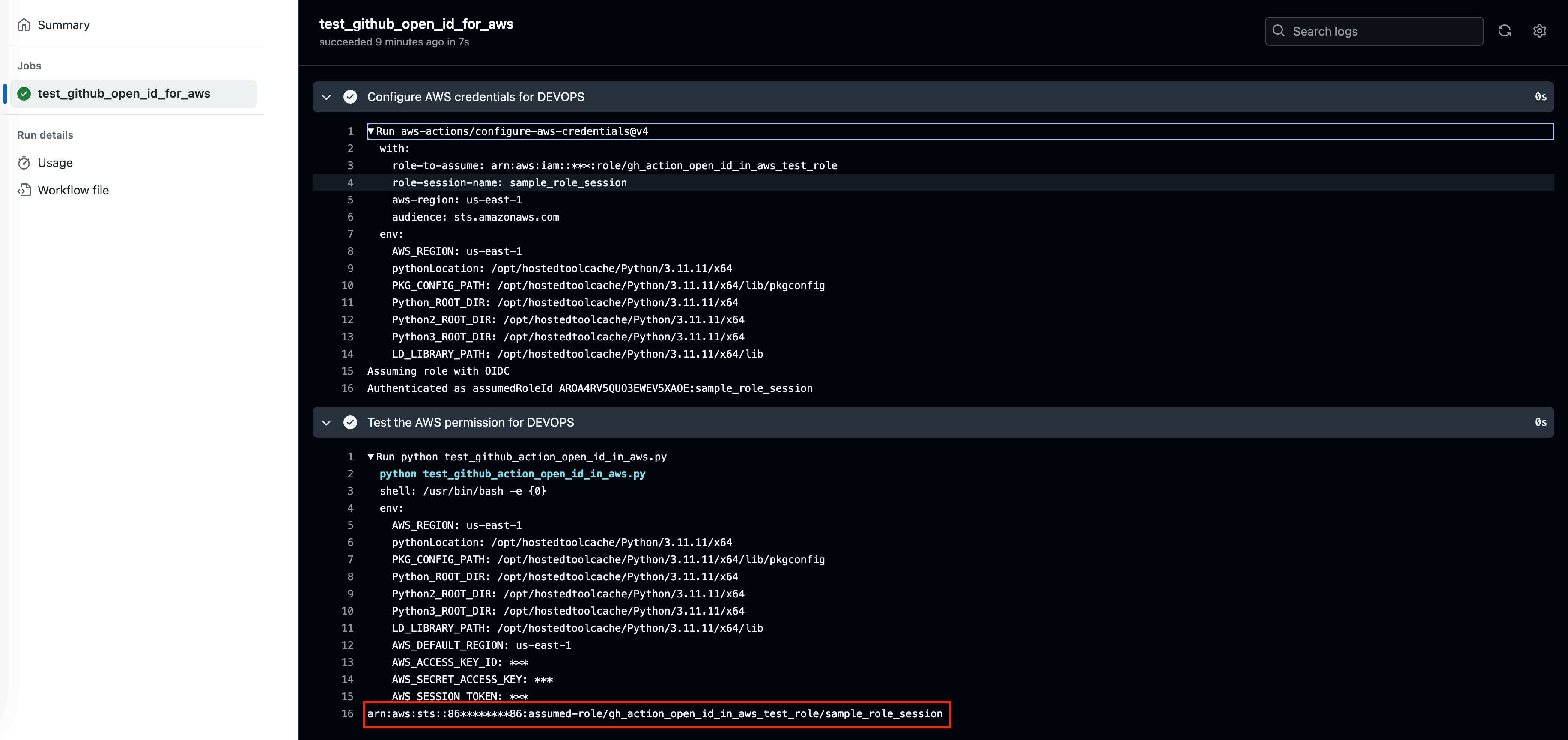
Finally, the GitHub Actions workflow run will look like this: